# Manage aggregation

When working with **semantic data models**, there are scenarios where you may need to apply **custom aggregations** for specific reports. For example, instead of using the default aggregation defined in the data model, such as the **sum of quantity sold,** you might want to calculate the **average quantity sold** for more accurate analysis.

**Plan’s aggregation feature** enables you to override native measure aggregations without requiring extensive changes at the data model level. This flexibility helps analysts and finance teams tailor calculations to specific reporting needs while preserving the integrity of the underlying model.

With Plan, you can:

* Define custom aggregations at the **measure or column level**
* Apply aggregation rules at the **hierarchy level**
* Control how aggregations behave for **row subtotals, column subtotals, and grand totals**

This powerful aggregation control ensures consistent, accurate reporting across different business views without duplicating measures or modifying core semantic models.

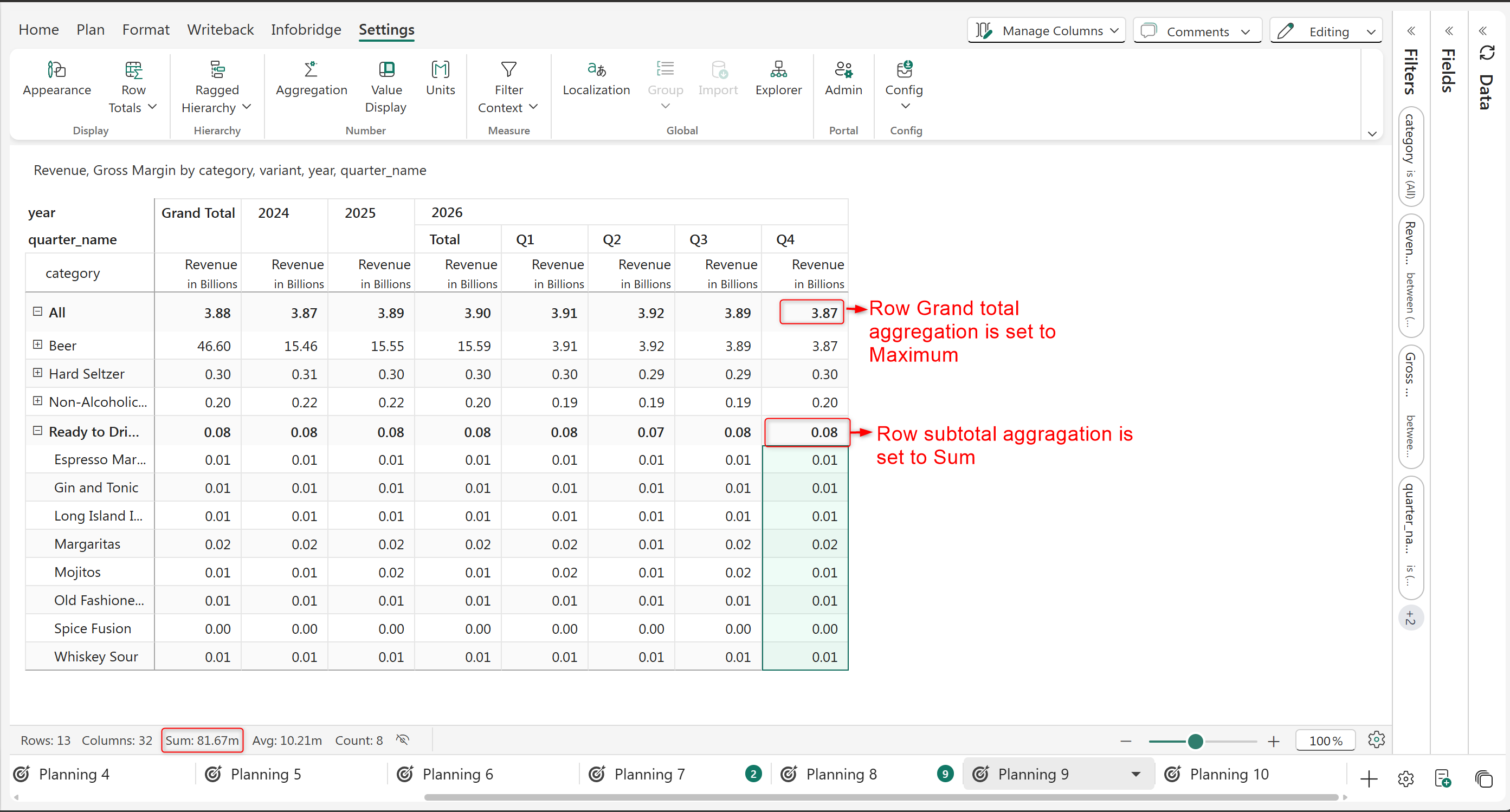
**Row aggregation:** You can specify the aggregation to be applied to row subtotals and grand total.

<figure><img src="/files/9vtrrVwEUOZ7GVSTCIcX" alt=""><figcaption></figcaption></figure>

<figure><img src="https://github.com/lumelinc/PowerTableDocs/blob/main/.gitbook/assets/image%20(1937).png" alt=""><figcaption><p>Row aggregation</p></figcaption></figure>

**Column aggregation:** You can specify the aggregation to be applied on the column grand total and subtotals.

<figure><img src="/files/wlH4Onu3eHE32xd9O68C" alt=""><figcaption></figcaption></figure>

<figure><img src="https://github.com/lumelinc/PowerTableDocs/blob/main/.gitbook/assets/image%20(1938).png" alt=""><figcaption><p>Column aggregation</p></figcaption></figure>

We will see in detail about how to set these aggregations below.

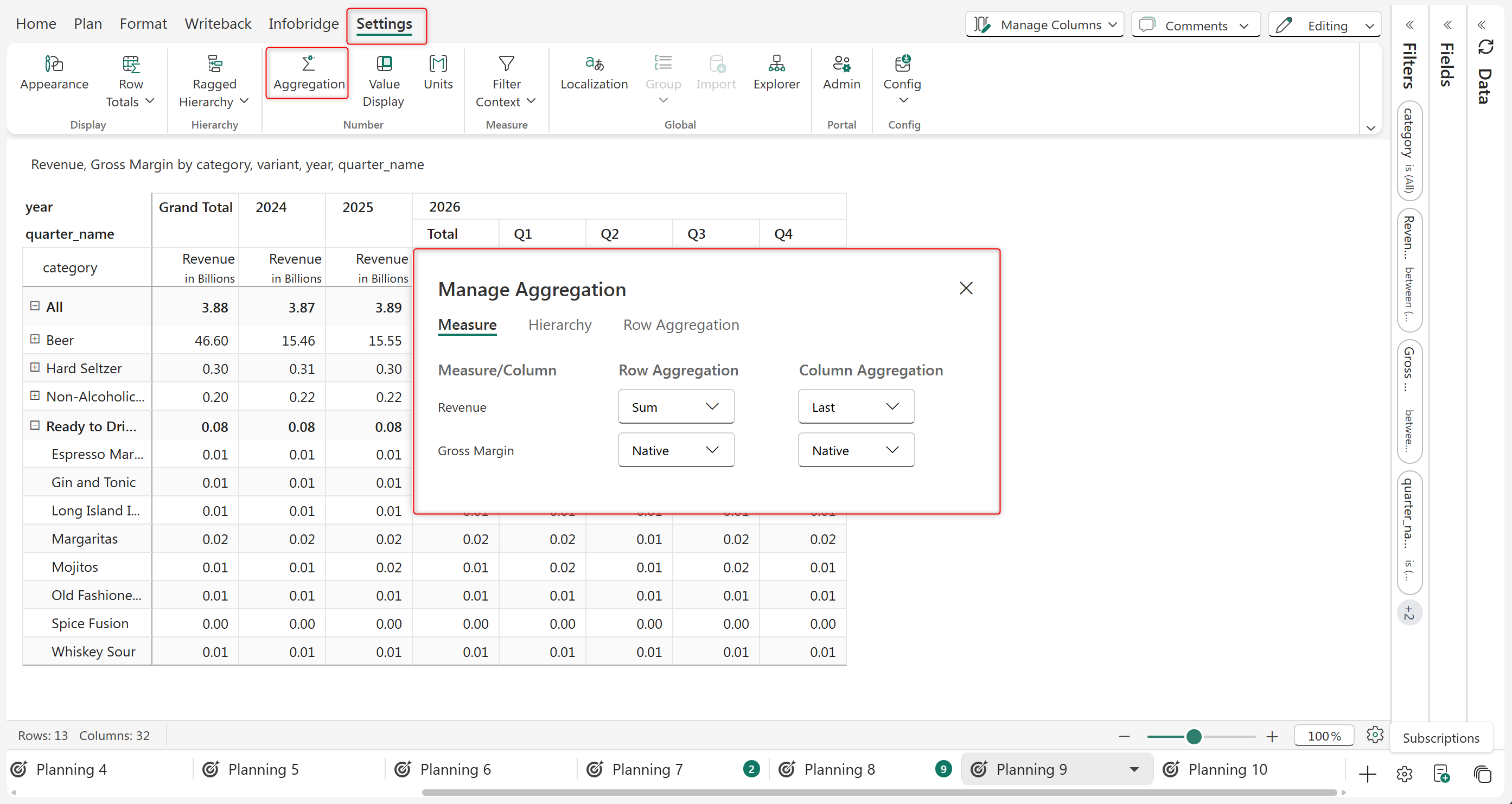
Click on the **Aggregation** button in the Settings tab to open the **Manage Aggregation** interface.

<figure><img src="/files/n01m0OdmEv7ubwdJJhJ9" alt=""><figcaption><p>Manage Aggregation panel</p></figcaption></figure>

The Manage Aggregation panel offers you three tabs:

* Measure: Lets you apply the aggregation at the Measure level
* Hierarchy: Lets you apply the aggregation at the Hierarchy
* Row Aggregation: Lets you apply aggregation at the Row Level

### 1. Measure level aggregation

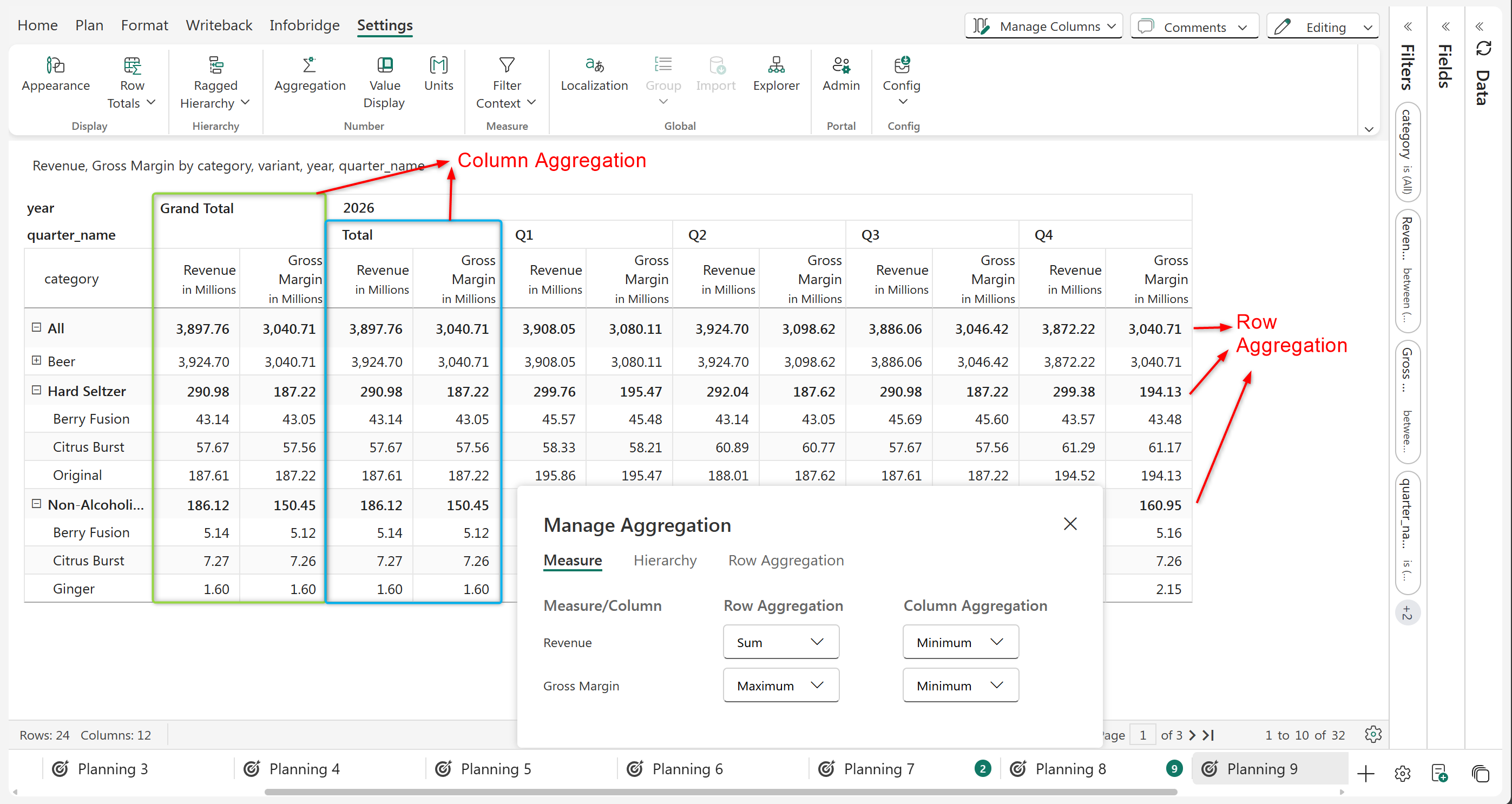
You can specify the row and column aggregation for individual measures and columns from the **Measure** tab. Select the aggregation type from the dropdown against the measure name.

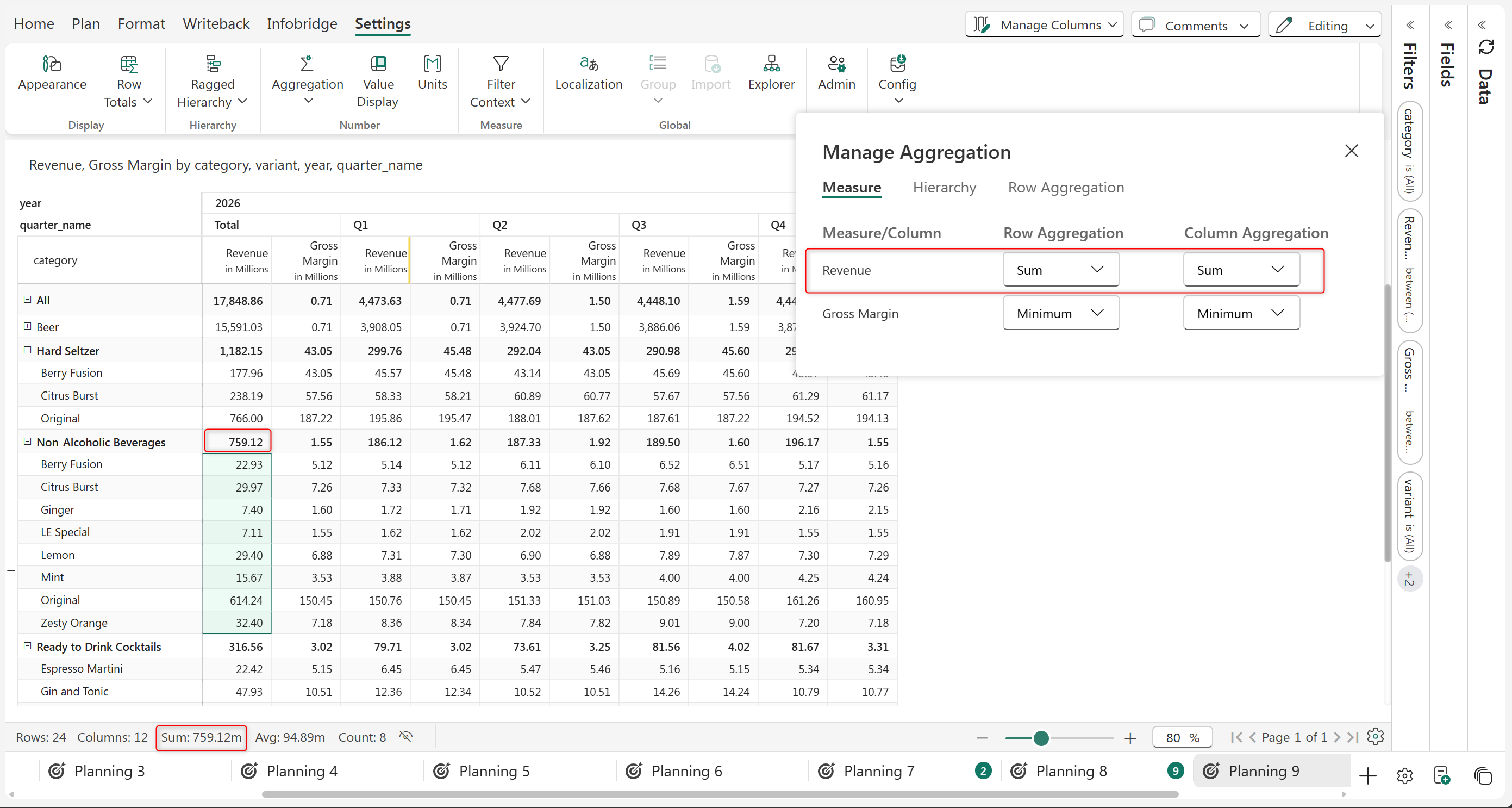
<figure><img src="/files/Z3ndzDNYNQvuNcNM4KHz" alt=""><figcaption></figcaption></figure>

<figure><img src="https://github.com/lumelinc/PowerTableDocs/blob/main/.gitbook/assets/image%20(1939).png" alt=""><figcaption><p>Measure level row and column aggregation</p></figcaption></figure>

* **Sum** set as row aggregation for 2026 Revenue: The sum of the child rows will be used to populate the row subtotal and grand total.
* **Maximum** set as row aggregation for 2026 Gross Margin: The maximum value in the child rows will be used to populate the row subtotal and grand total.
* **Minimum** set as column aggregation for 2024 Revenue and Gross Margin: The minimum values in the columns will be used as the column grand total and subtotal.

### 2. Row Level Aggregation

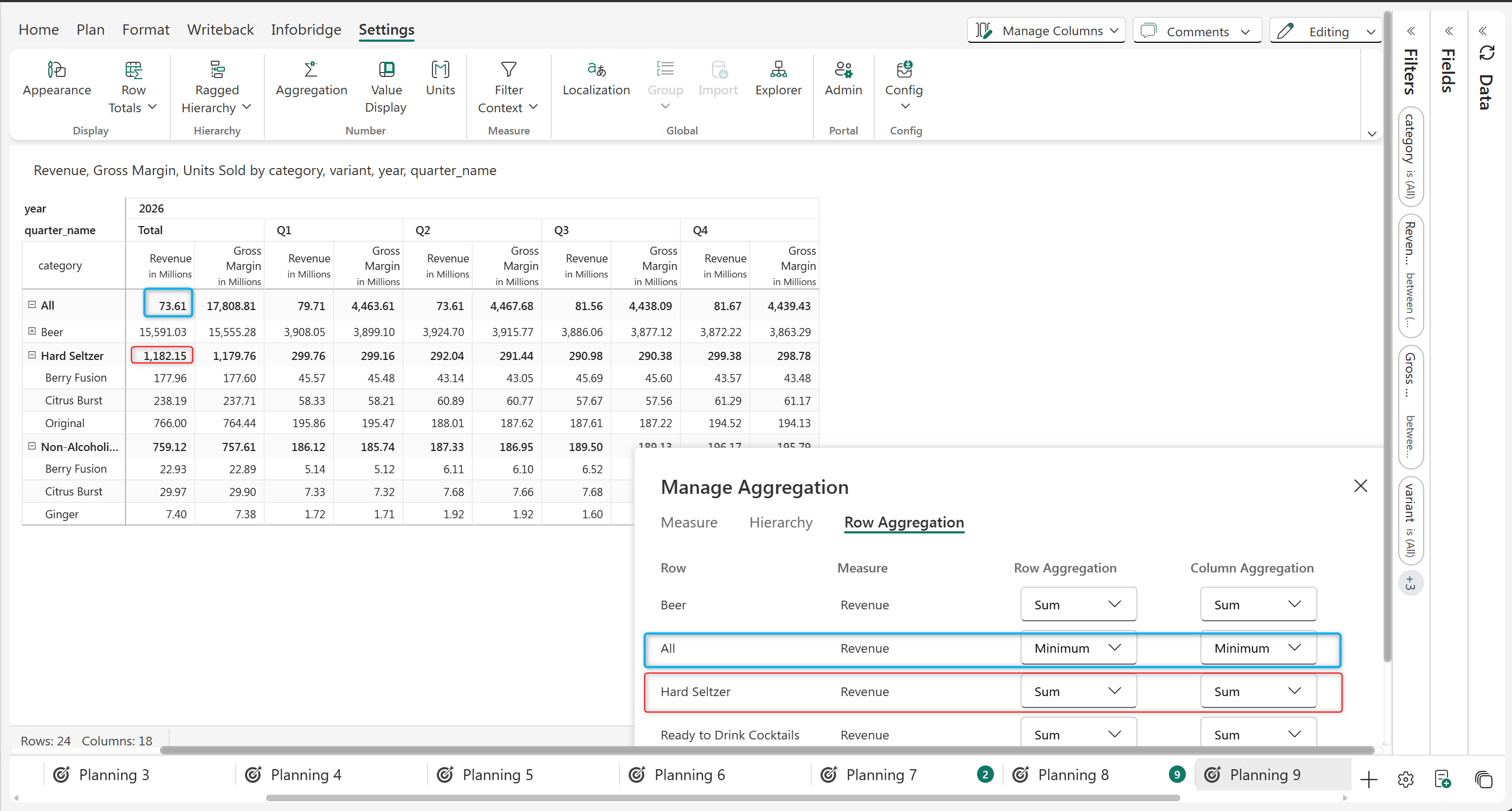
Row-level aggregation allows you to set the aggregation for each row separately.

In the highlighted example below, the 'Hard Seltzer' category is the sum of its immediate child nodes and has 'Sum' Aggregation, while the 'All' row has an Aggregation type set as 'Minimum'.

<figure><img src="/files/g852TJLy1f6M4q1Nm9k1" alt=""><figcaption><p>Row Level Aggregation</p></figcaption></figure>

### 3. Hierarchy Level Aggregation

Hierarchy Level Aggregation allows you to set the aggregation type at the Hierarchical level

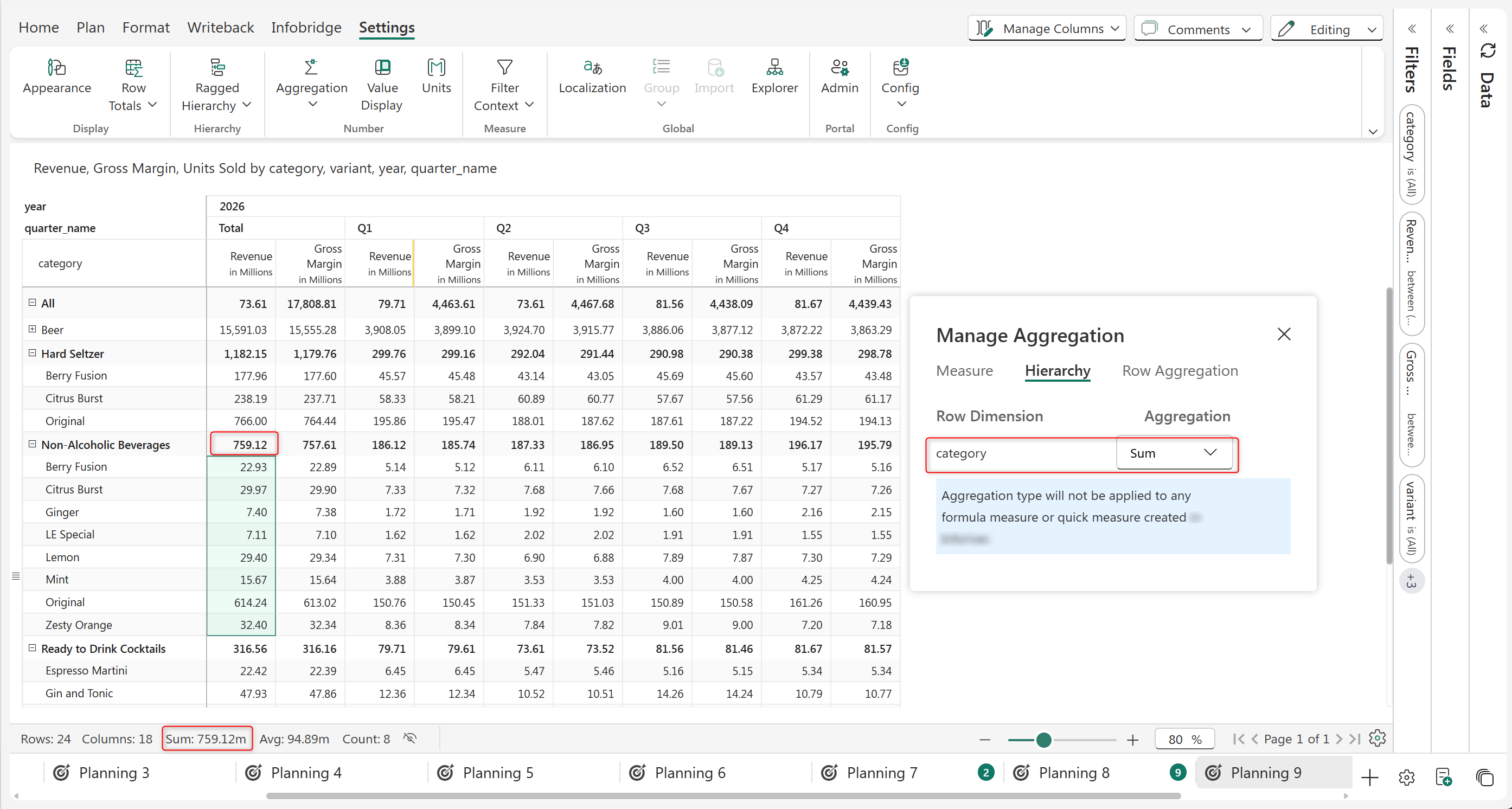
Consider the example below, where the category hierarchy aggregation is set as 'Sum'. Each category has the sum of its child nodes.

<figure><img src="/files/yGLMvyEhqISUE04oKLkF" alt=""><figcaption><p>Hierarchy Level aggregation</p></figcaption></figure>

### 4. Aggregation types

Plan offers various types of aggregation types built in to suit various business needs. Here we will discuss the aggregation types in detail.

#### Native

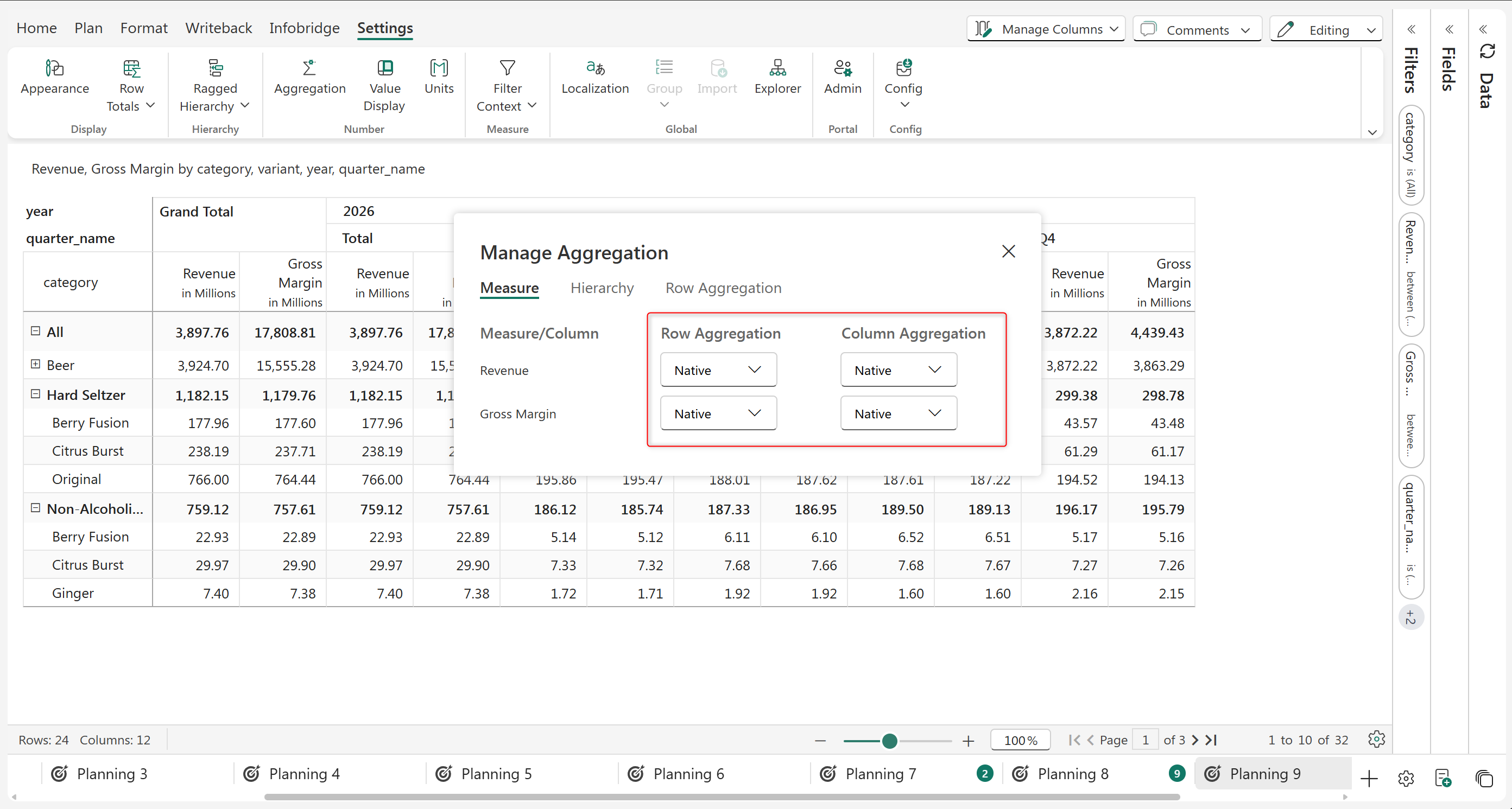
By default, the 'Native' option is applied which follows the native summarization set in Power BI.

<figure><img src="/files/yn6luH6POWqlYzKR0ERT" alt=""><figcaption></figcaption></figure>

<figure><img src="https://github.com/lumelinc/PowerTableDocs/blob/main/.gitbook/assets/image%20(696).png" alt=""><figcaption><p>Native aggregation at report level</p></figcaption></figure>

#### None

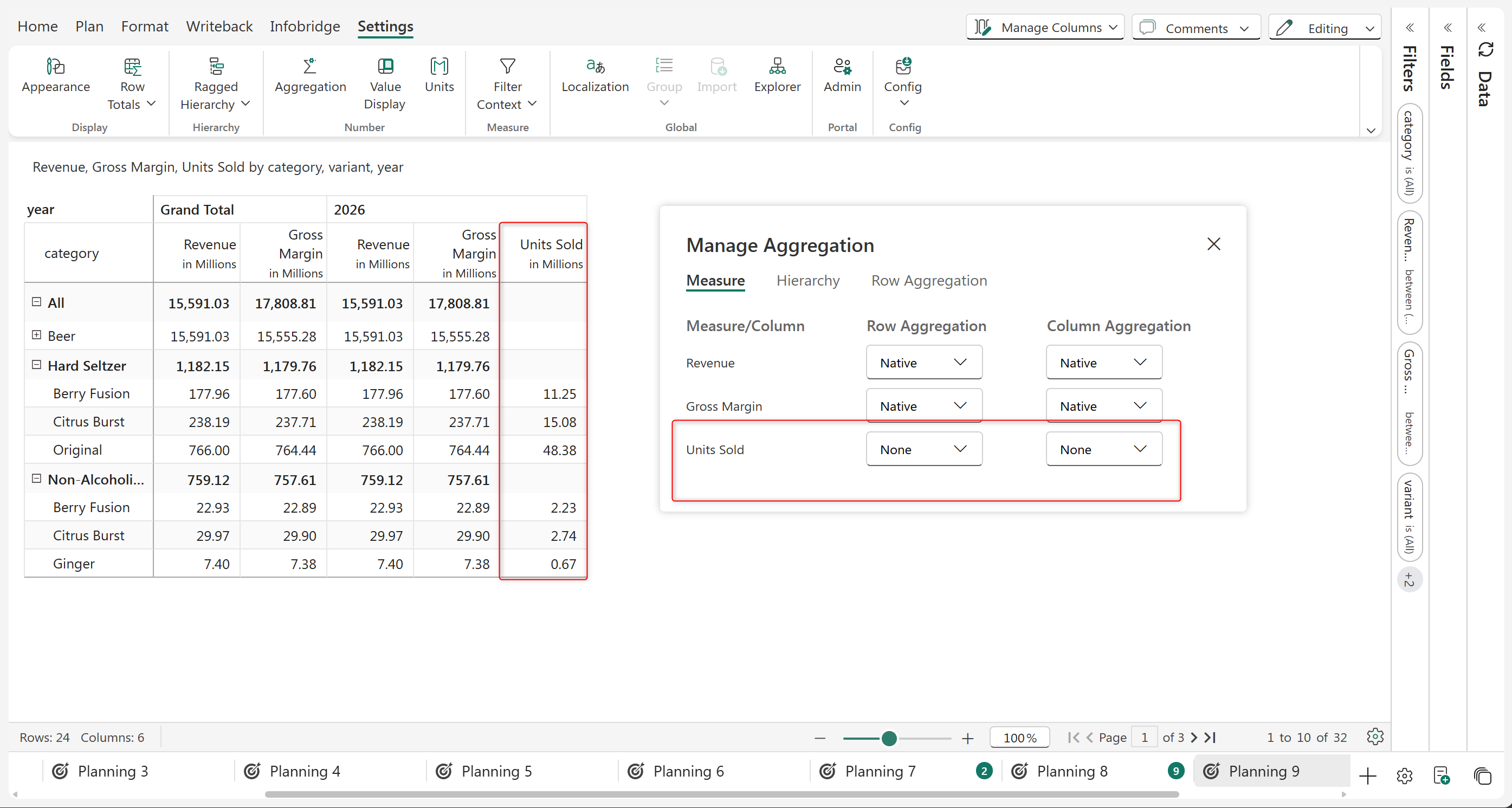
Choosing 'None' performs no aggregations for the selected measure or hierarchy. In the example below, the 'Units Sold' measure is not aggregated.

<figure><img src="/files/YUfKcYKbUKYZgpFi40uS" alt=""><figcaption></figcaption></figure>

<figure><img src="https://github.com/lumelinc/PowerTableDocs/blob/main/.gitbook/assets/image%20(440).png" alt=""><figcaption><p>Aggregation is 'None'</p></figcaption></figure>

#### Sum

'Sum' aggregation displays the sum of the immediate child nodes as the aggregate. In the highlighted example, the 'Nin Alcoholic Beverages' category is the sum of its immediate child nodes.

<figure><img src="/files/RLKDBQeYuxhkW0MdbCR3" alt=""><figcaption><p>Aggregation is 'Sum'</p></figcaption></figure>

#### Minimum

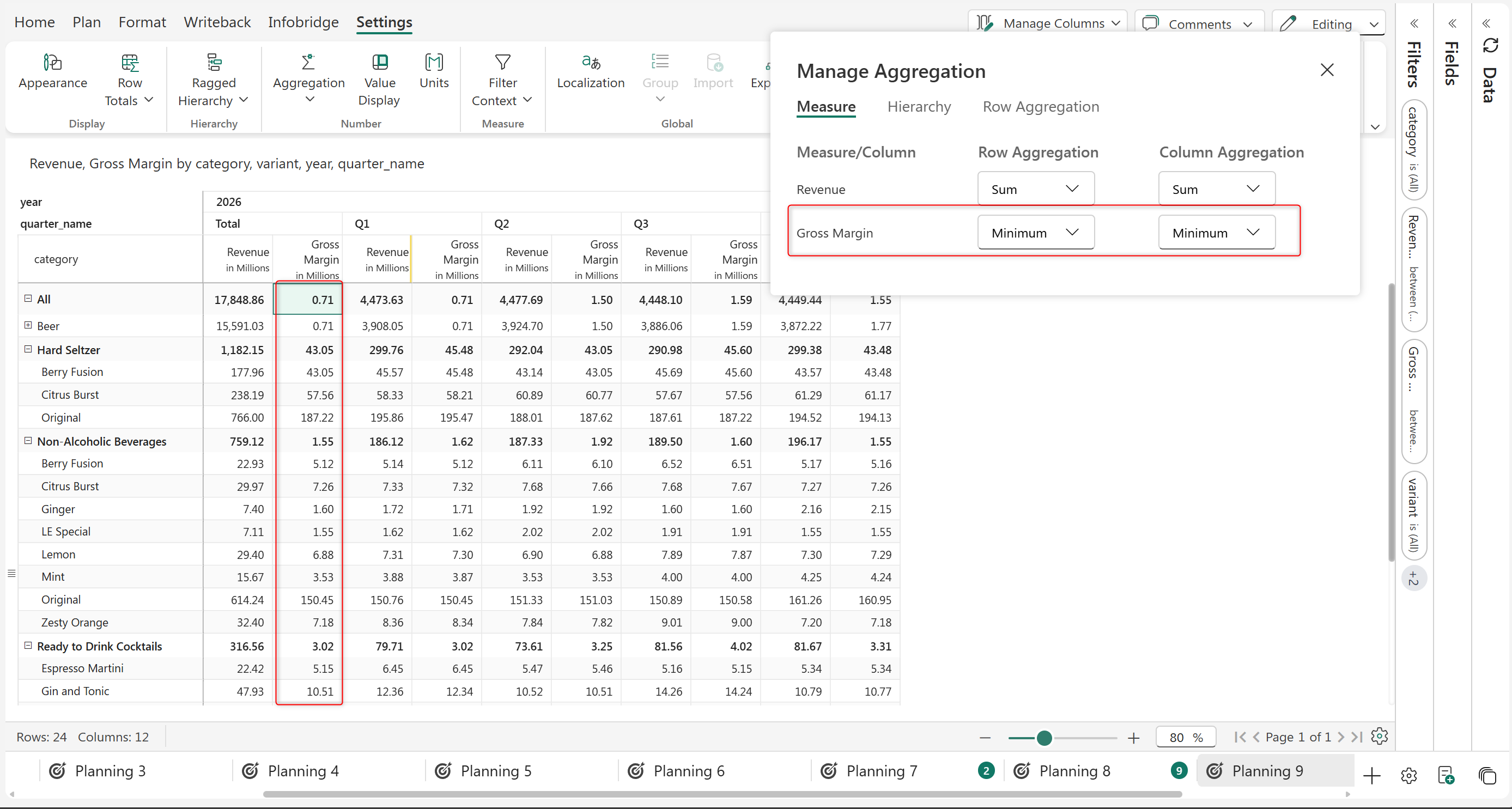
'Minimum' aggregation displays the minimum value of the immediate child nodes as the aggregate. In the example below, the 'Gross Margin' displays the minimum value among its child nodes which is the value of 'Beer'.

<figure><img src="/files/ZvLuJ87KPCIHnXYRrDko" alt=""><figcaption></figcaption></figure>

<figure><img src="https://github.com/lumelinc/PowerTableDocs/blob/main/.gitbook/assets/image%20(698).png" alt=""><figcaption><p>Minimum aggregation type</p></figcaption></figure>

#### Maximum

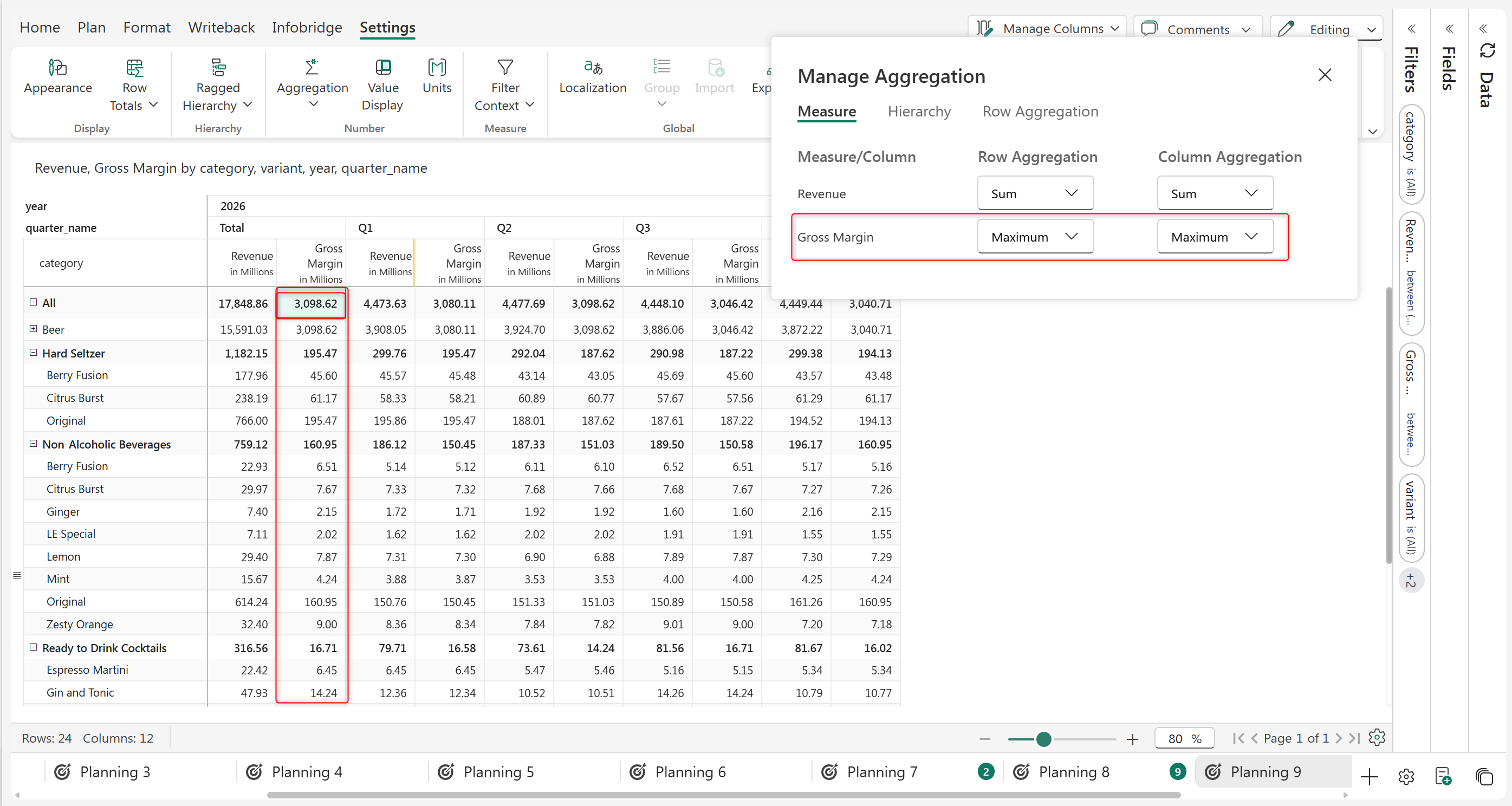
'Maximum' aggregation displays the maximum value of the immediate child nodes as the aggregate. In the image below , the 'Gross Margin' displays the maximum value of its immediate child nodes which is the value of 'Beer'.

<figure><img src="/files/4S6dAzl9g15YBbWg76AY" alt=""><figcaption></figcaption></figure>

<figure><img src="https://github.com/lumelinc/PowerTableDocs/blob/main/.gitbook/assets/image%20(699).png" alt=""><figcaption><p>Maximum aggregation type at report level</p></figcaption></figure>

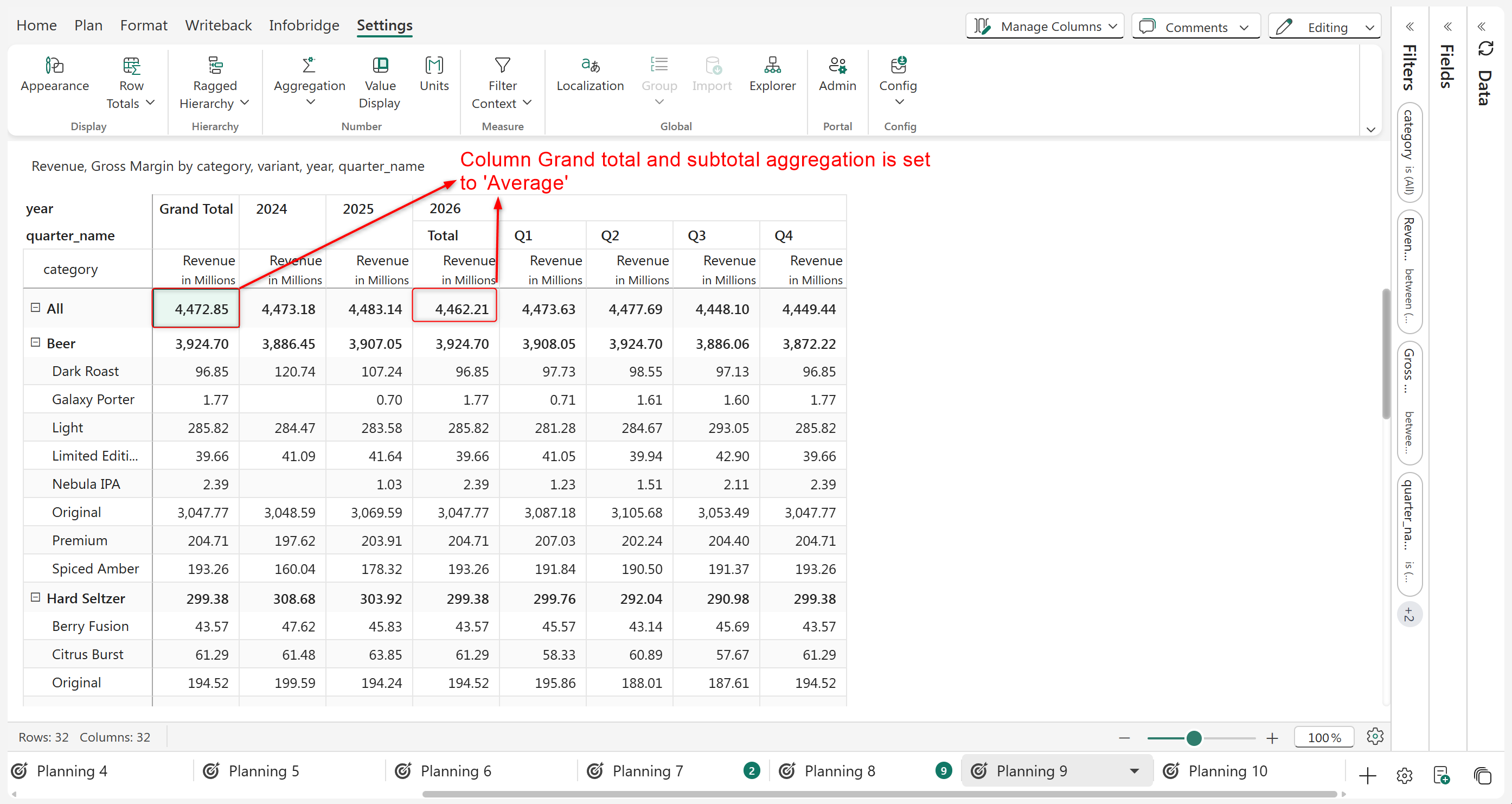
#### Average (Children)

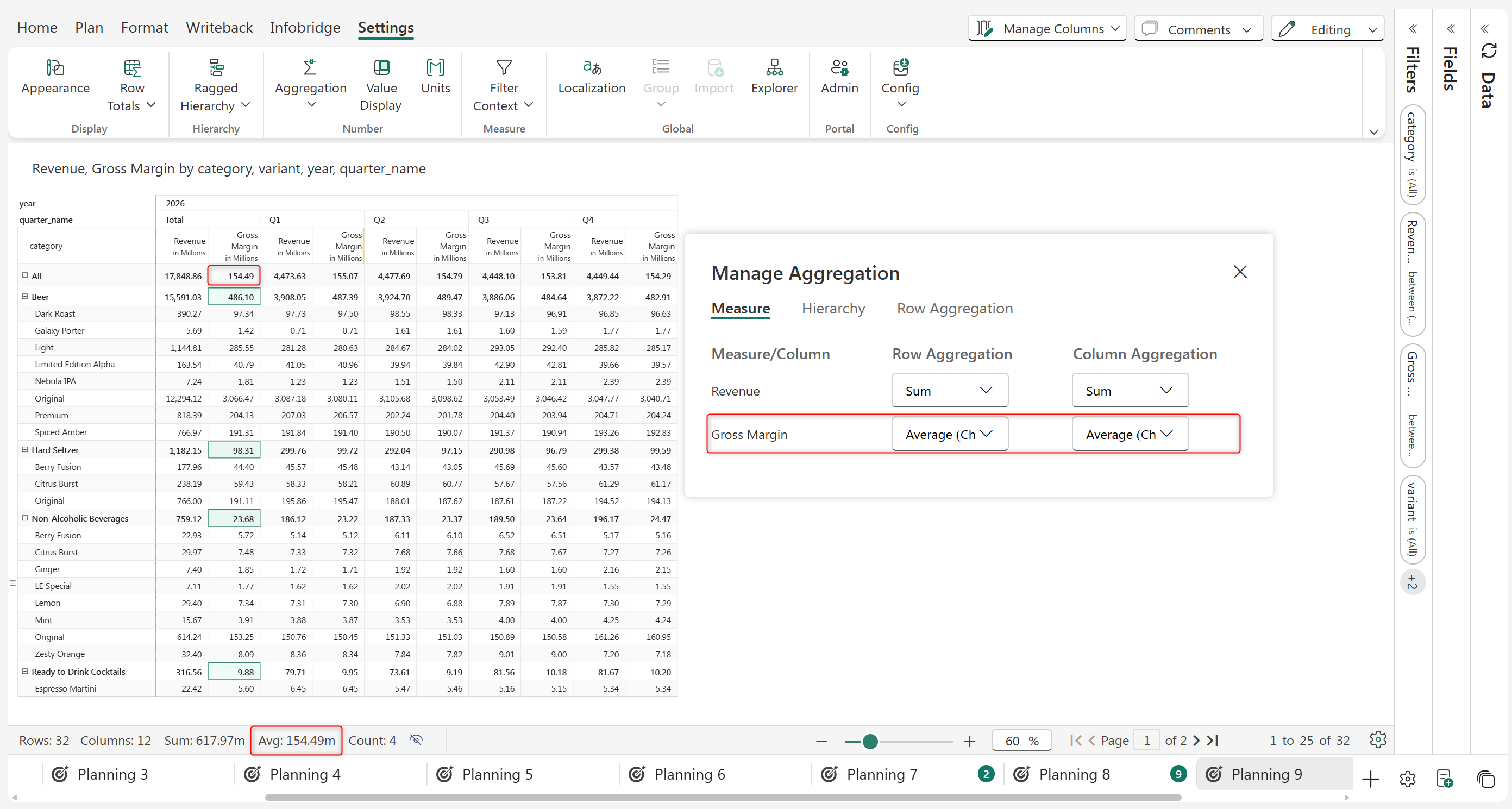
'Average (Children)' aggregation displays the average value of the immediate child nodes as the row aggregation. In the example below, the 'Gross Margin' measure is aggregated as 'Average (Children)'. The Average of the Categories are calculated under the 'Average(Children)' aggregation.

<figure><img src="/files/isrRw4ZuGxjnWQTIIWQc" alt=""><figcaption></figcaption></figure>

<figure><img src="https://github.com/lumelinc/PowerTableDocs/blob/main/.gitbook/assets/image%20(700).png" alt=""><figcaption><p>Average(children) aggregation type</p></figcaption></figure>

{% hint style="info" %}
When Average excluding zero is selected, the zero values are excluded from being considered for the average calculation.
{% endhint %}

#### Average (Leaf)

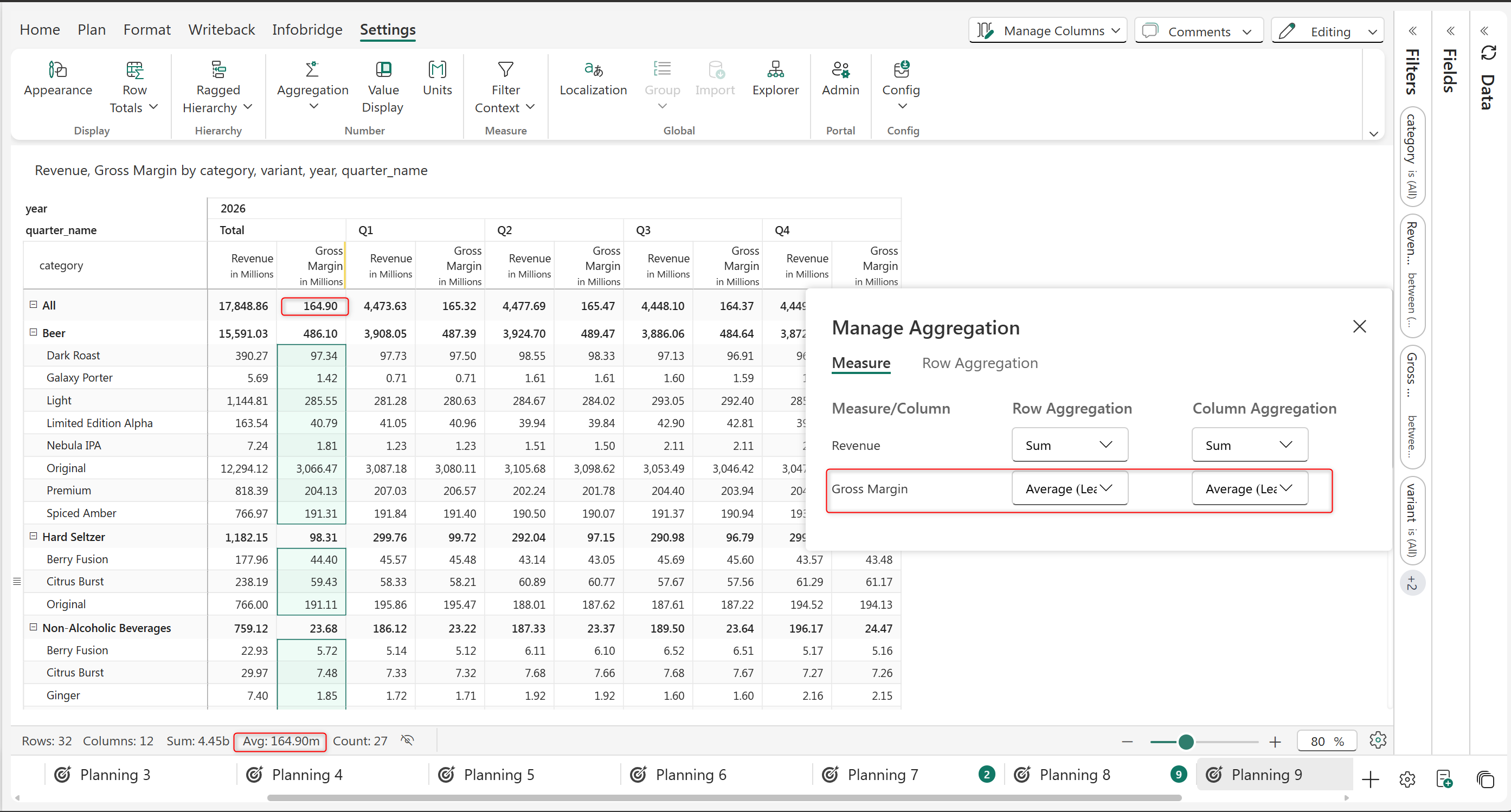
'Average (Leaf)' aggregation displays the average value of all the leaf nodes of the row category as the row aggregation. In the below example, 'Gross Margin' is calculated as the average of the leaf nodes of all the variant values.

<figure><img src="/files/ZVnGVaofiqQae06PWry8" alt=""><figcaption></figcaption></figure>

<figure><img src="https://github.com/lumelinc/PowerTableDocs/blob/main/.gitbook/assets/image%20(701).png" alt=""><figcaption><p>Average(leaf) aggregation type</p></figcaption></figure>

#### Standard deviation

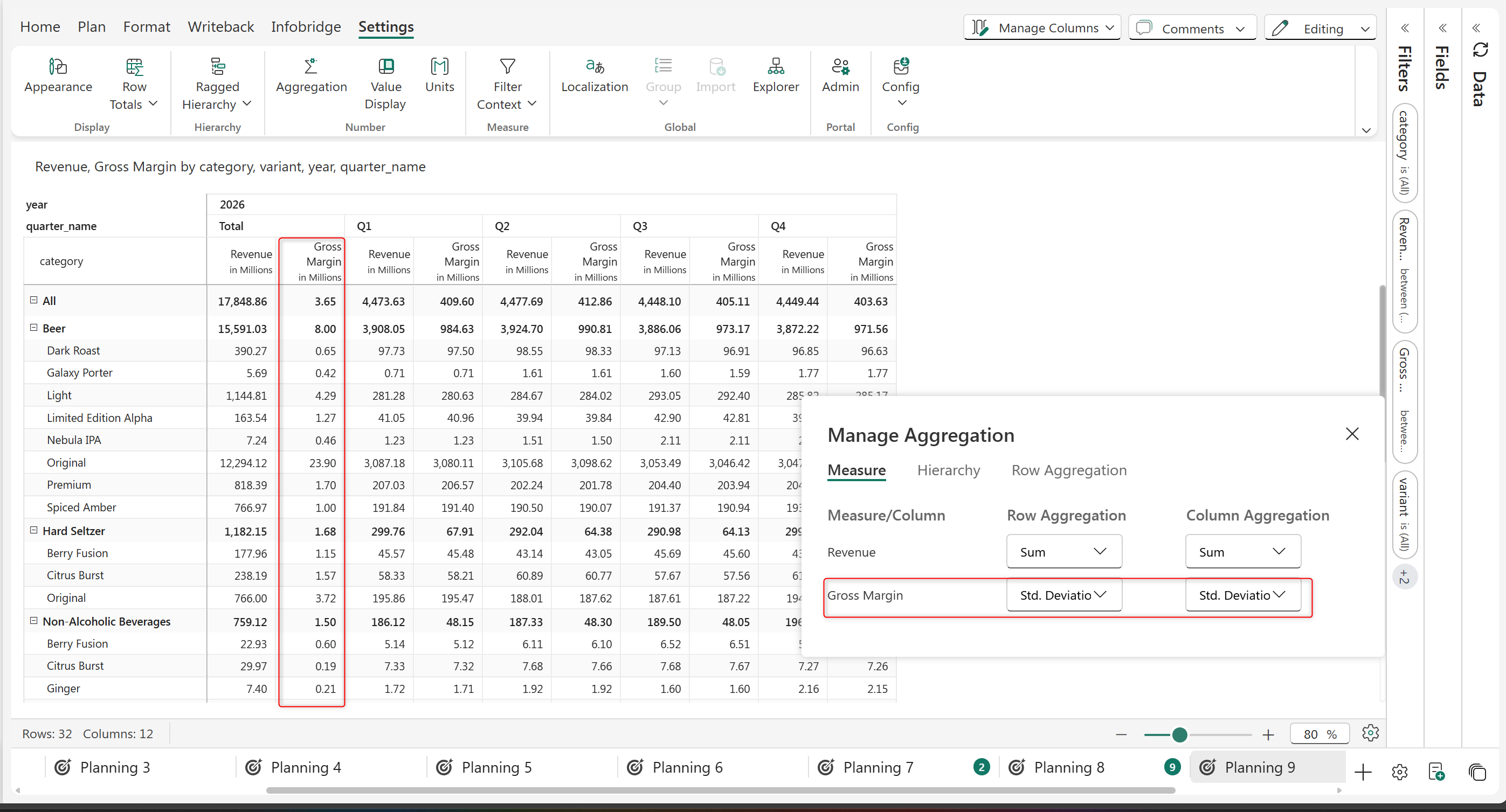
'Standard deviation' aggregation displays the standard deviation of the child rows as the aggregate. In the example below, 'Gross Margin' is aggregated as the standard deviation of its child nodes.

<figure><img src="/files/X4tyXR5QvKFR9l9gUEvw" alt=""><figcaption></figcaption></figure>

<figure><img src="https://github.com/lumelinc/PowerTableDocs/blob/main/.gitbook/assets/image%20(702).png" alt=""><figcaption><p>Standard Deviation as aggregation type</p></figcaption></figure>

#### Visible rounding

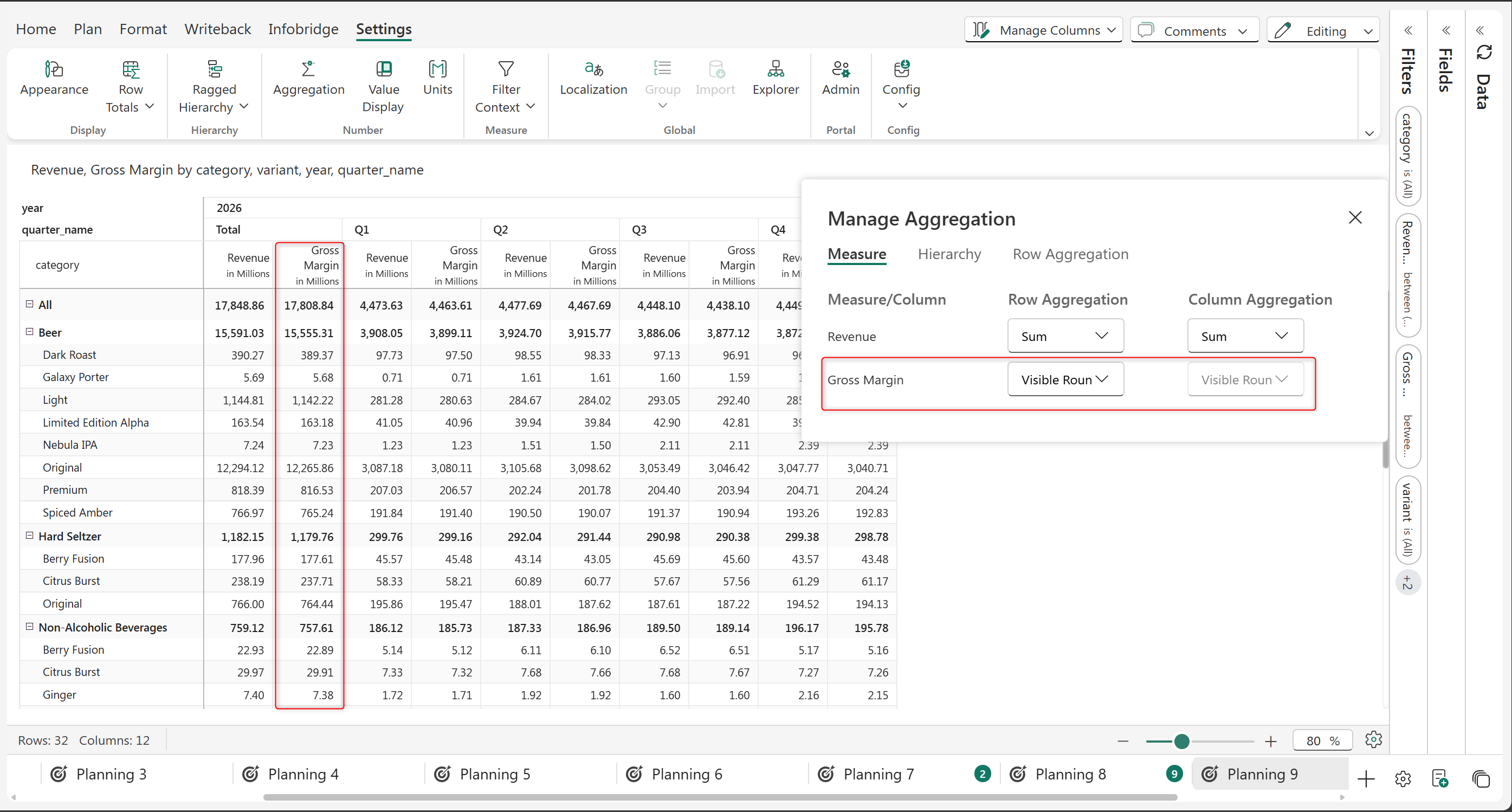
'Visible rounding' aggregation rounds off values in a way that the individual values add up properly to the subtotal and grand total. This is a very common requirement in external financial statement reporting, such as the income statement and balance sheet reporting.

<figure><img src="/files/zNoGBNIsnvhFn1onuE4x" alt=""><figcaption></figcaption></figure>

<figure><img src="https://github.com/lumelinc/PowerTableDocs/blob/main/.gitbook/assets/image%20(703).png" alt=""><figcaption><p>Visible Rounding as an aggregation type at report level</p></figcaption></figure>

#### Weighted Average

In weighted average aggregation, each child value in a row category is multiplied with weights taken from another measure which are then summed and divided by the total weight.

Weighted moving average = (w1\*a1 + w2\*a2 +...+wn\*an) / (w1+w2+...+wn),

where

n= number of child rows in the row category

w1,w2,w3,....wn = weights (data from measure 1)

a1,a2,a3,........an = data from measure 2

This type of averaging is sometimes more accurate than simple averaging as it considers the varying importance of the data points. This also smoothens any price point fluctuations and is commonly used for inventory accounting, portfolio analysis, statistical research, planning, and forecasting.

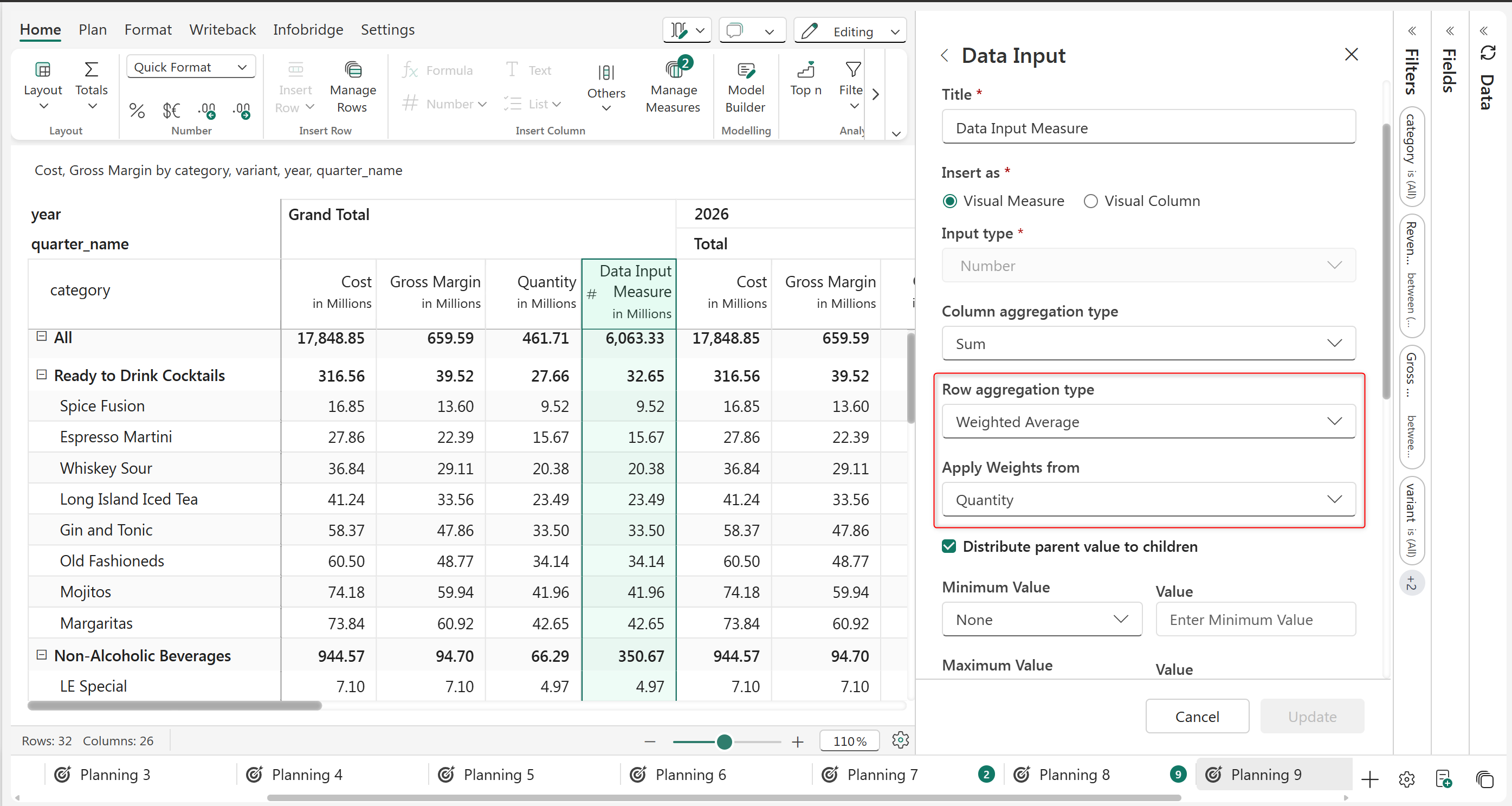
The example below calculates the weighted average using the costs and quantities in each region.

i.e., Average Cost for Data Input Measure = \[(Quantity\*Cost) *in Ready to Drink Cocktail*+ (Quantity\*Cost) *in* *Non-Alcoholic Beverages*+ (Quantity\*Cost) *in Hard Seltzer* + (Quantity\*Cost) *in Beer* ] / Total Quantity.

{% hint style="info" %}
Note that weighted average is a row aggregation method – only the total and subtotal rows will reflect the calculation.
{% endhint %}

<figure><img src="/files/4E4OWXdXjYntCxI6tzaO" alt=""><figcaption></figcaption></figure>

<figure><img src="https://github.com/lumelinc/PowerTableDocs/blob/main/.gitbook/assets/image%20(1512).png" alt=""><figcaption><p>Weighted Average as the row aggregation type for data input measure</p></figcaption></figure>

{% hint style="info" %}
'Weighted Average' aggregation can be applied only to data input, formula, and forecast measures.
{% endhint %}

#### Formula

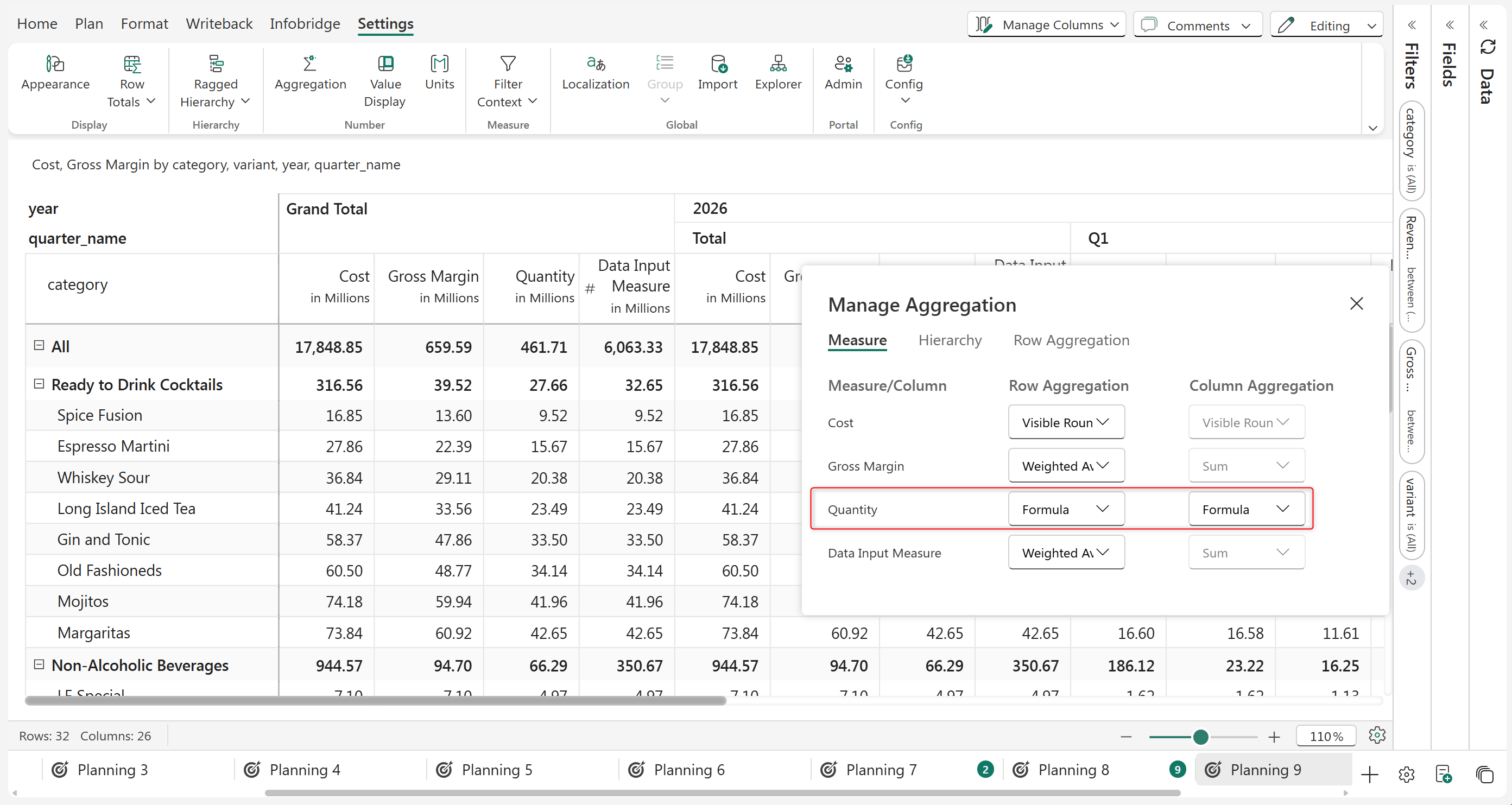
When 'Formula' is selected, then the Formula used for computing the values of the Formula column is used for computing the Totals and Subtotals.

<figure><img src="/files/azdzqCGcgBHhzqLx4Bbn" alt=""><figcaption><p>The formula is chosen in the Aggregation type.</p></figcaption></figure>

{% hint style="info" %}
Applicable only for Formula Columns and Measures.
{% endhint %}

#### First

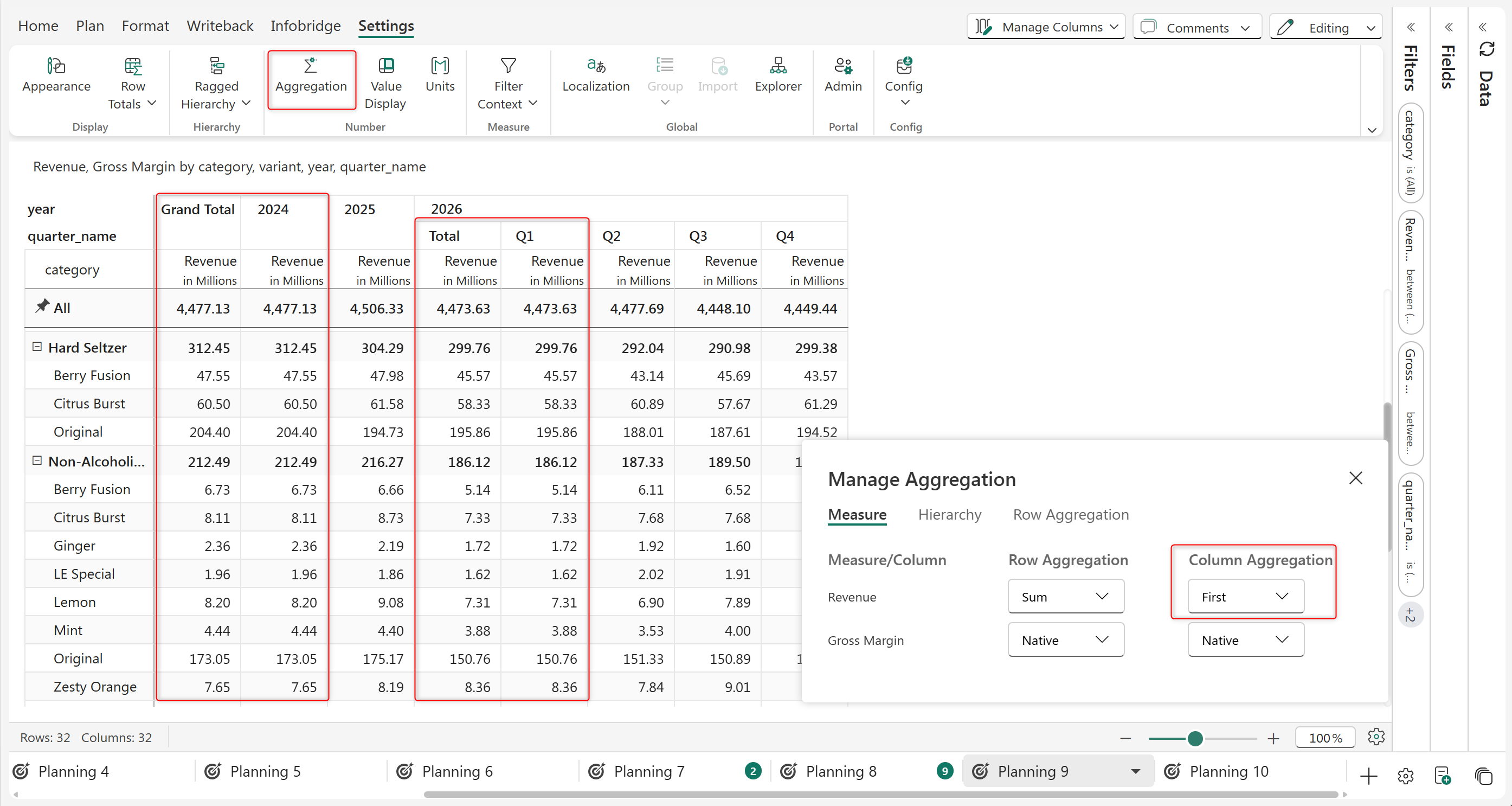
This aggregation type is often used in time-series data or any sequential dataset. The 'First' aggregation type displays the first value from the set of immediate child nodes. This is especially useful when we need to record the dataset's initial state or value.

In the example below, the values from the first period are used for the column subtotals and grand totals. In the example, the Revenue from Q1 2026 is used as the subtotals at the year level. The Revenue from 2024 (the earliest year) is used for the grand total.

<figure><img src="/files/QTtbORebAuaDURdVNby4" alt=""><figcaption></figcaption></figure>

<figure><img src="https://github.com/lumelinc/PowerTableDocs/blob/main/.gitbook/assets/7.1.%20First%20aggregation%20type.png" alt=""><figcaption><p>First aggregation</p></figcaption></figure>

#### Last

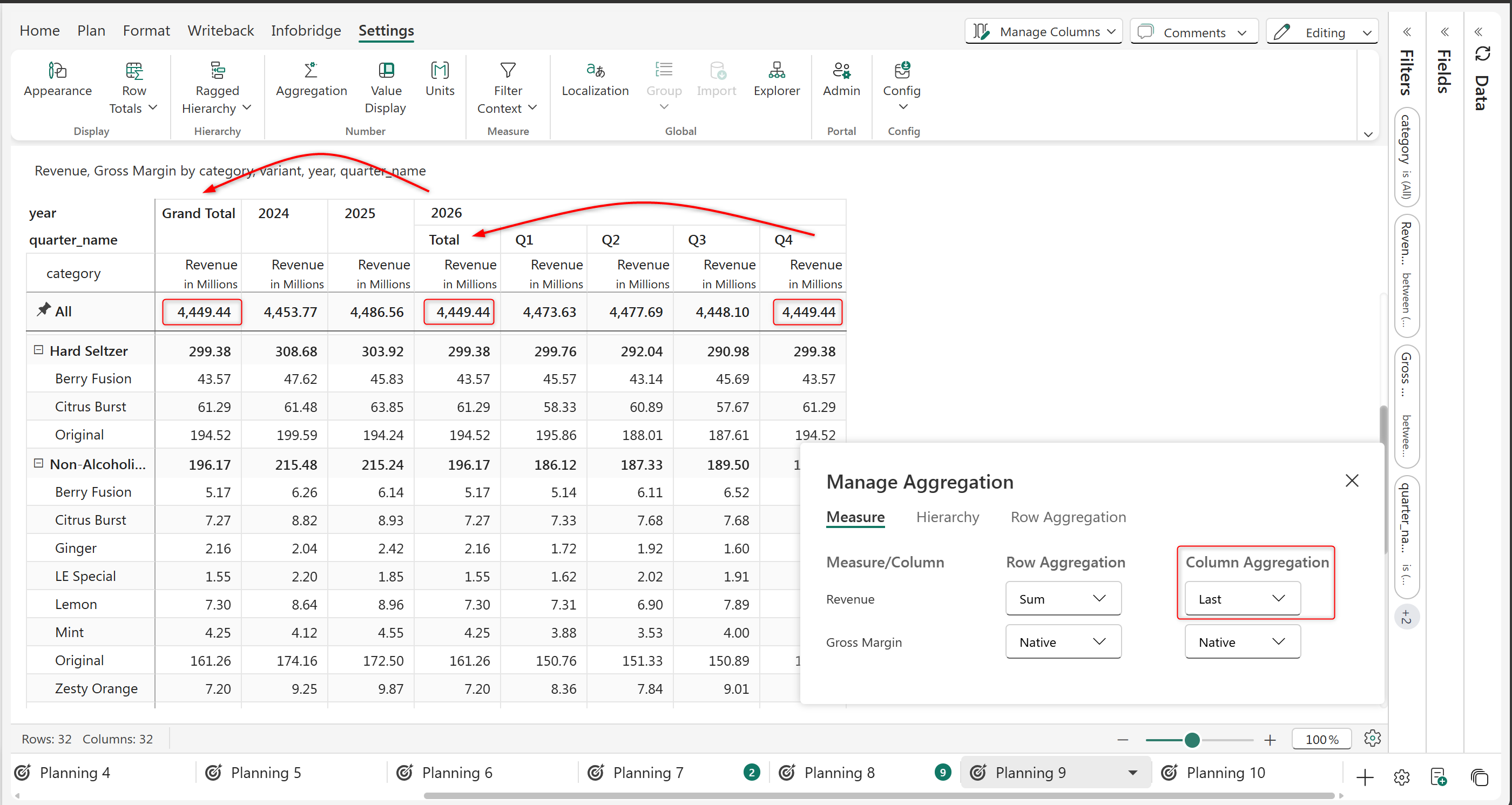
This aggregation type is used in time-series data or any sequential dataset. The 'Last' aggregation type displays the last value or the latest value from the set of immediate child nodes. This is useful when we need the most recent value in a dataset, especially when budgeting for the following year by carrying over the previous year's value.

In the example below, the last period is used to populate the grand totals and subtotals. The Revenue of Q4-2026 is used to populate the yearly subtotal. The Revenue of 2026 is used to populate the grand total.

<figure><img src="/files/1SIJuc8BENUeoiOY5t94" alt=""><figcaption></figcaption></figure>

<figure><img src="https://github.com/lumelinc/PowerTableDocs/blob/main/.gitbook/assets/7.2.%20Last%20aggregation%20type.png" alt=""><figcaption><p>Last aggregation</p></figcaption></figure>

Refer to know in detail about [Row Aggregation](/planning-sheets/how-tos/adding-business-logic-and-formulae/manage-aggregation/row-aggregation.md). Refer to know in detail about [Column Aggregation](/planning-sheets/how-tos/7.-planning-budgeting-and-forecasting/column-aggregation.md).


---

# Agent Instructions: Querying This Documentation

If you need additional information that is not directly available in this page, you can query the documentation dynamically by asking a question.

Perform an HTTP GET request on the current page URL with the `ask` query parameter:

```
GET https://docs.fabricplan.com/planning-sheets/how-tos/adding-business-logic-and-formulae/manage-aggregation.md?ask=<question>
```

The question should be specific, self-contained, and written in natural language.
The response will contain a direct answer to the question and relevant excerpts and sources from the documentation.

Use this mechanism when the answer is not explicitly present in the current page, you need clarification or additional context, or you want to retrieve related documentation sections.